
Photoshop – Cara Install Brush dan Action
Monday, April 6, 2009 11:06Posted in category 2.Dasar-dasar Photoshop
Brush merupakan sebuah tool dalam Photoshop yang digunakan untuk membuat gambar-gambar yang beraneka ragam. Photoshop sendiri sudah menyertakan beberapa pilihan brush yang siap pakai. Namun kita juga bisa Menambahkan sendiri brush tersebut.
berikut ini beberapa tip langkah-langkah untuk meng-install brush dan action di Photoshop.
Meng-install Brush
- jalankan program Adobe Photoshop
- klik Brush Tool, terus buka Brushes Palette (jika belum aktif, coba masuk ke Menu Window>>Brushes, atau tekan F5)
- klik di pojok Brushes Palette tanda seperti gambar di bawah ini,
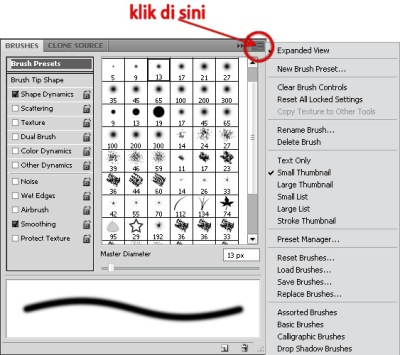
- kemudian klik Load Brushes…
- selanjutnya cari lokasi di mana file Brush yang ingin di install (sebagai contoh di sini, saya menggunakan Water Brush), kemudian klik Load atau tekan Enter.
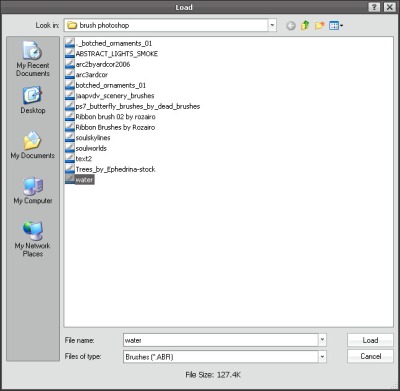
- Brush pilihan Anda siap untuk digunakan.


Meng-install Action
- jalankan program Adobe Photoshop
- buka Actions Palette (jika belum aktif, coba masuk ke Menu Window>>Actions, atau tekan Alt+F9)
- klik di pojok Actions Palette tanda seperti gambar di bawah ini,

- kemudian klik Load Actions…
- selanjutnya cari lokasi di mana file Action yang ingin di install (sebagai contoh di sini, saya menggunakan Water Over Text), kemudian klik Load atau tekan Enter.

- Brush pilihan Anda siap untuk digunakan.


Catatan:
- Hasil load Brush dan Action tadi biasanya terdapat di posisi paling akhir dari sekian Brush dan Action default dari Photoshop.
- Untuk membedakan mana file Brush dan Action dengan file-file plug in lainnya cukup dengan melihat ekstensi dari file itu sendiri. File ekstensi untuk Brush berupa ABR, dan file ekstensi untuk Action berupa ATN.
- Terkadang sebuah file Action tidak dapat dijalankan, hal ini bisa disebabkan ada perintah yang tidak sempurna saat proses pembuatannya, atau juga bisa jadi file Action tersebut tidak sesuai dengan versi photoshop yang digunakan
You can follow any responses to this entry through the RSS 2.0 feed.
You can leave a response, or trackback from your own site.
1,650 Responses to “Photoshop – Cara Install Brush dan Action”
Leave a Reply
You must be logged in to post a comment.


https://slotzy24.se says:
October 13th, 2026 at 10:23 PM
… [Trackback]
[…] Info to that Topic: arnanmax.com/tutorial/photoshop/2dasar-dasar-photoshop/photoshop-cara-install-brush-dan-action/ […]
esports says:
October 16th, 2026 at 3:02 AM
esports
[…]below youll find the link to some sites that we assume it is best to visit[…]
shaka says:
October 16th, 2026 at 8:17 PM
shaka
[…]Here are some of the internet sites we recommend for our visitors[…]
esports says:
October 19th, 2026 at 6:34 AM
esports
[…]always a major fan of linking to bloggers that I adore but do not get a whole lot of link really like from[…]
estate agents says:
October 20th, 2026 at 1:07 PM
estate agents
[…]The info talked about within the write-up are a few of the best accessible […]
reputation partners says:
October 25th, 2026 at 3:47 PM
reputation partners
[…]usually posts some extremely interesting stuff like this. If youre new to this site[…]
best crypto casino reddit says:
October 26th, 2026 at 12:30 PM
best crypto casino reddit
[…]although web-sites we backlink to below are considerably not associated to ours, we really feel they are really really worth a go by way of, so possess a look[…]
bulbea says:
October 30th, 2026 at 8:42 PM
bulbea
[…]always a massive fan of linking to bloggers that I love but really don’t get lots of link love from[…]
Thai Massage East London says:
November 5th, 2026 at 4:44 PM
… [Trackback]
[…] Find More Info here on that Topic: arnanmax.com/tutorial/photoshop/2dasar-dasar-photoshop/photoshop-cara-install-brush-dan-action/ […]
IV drip Phuket says:
November 5th, 2026 at 5:14 PM
… [Trackback]
[…] There you can find 55916 additional Info to that Topic: arnanmax.com/tutorial/photoshop/2dasar-dasar-photoshop/photoshop-cara-install-brush-dan-action/ […]