
Solusi HRESULT 0xc8000222 Saat Install .Net Framework 4
Tuesday, September 9, 2014 12:27Posted in category Komputer

Tanpa perlu basa basi. Ini dia caranya :
1. Click Start > Run.
2. Tulis cmd dan tekan Enter, kemudian Ketik net stop WuAuServ

3. Click Start > Run, tulis %windir% dan tekan Enter.
4. Cari folder SoftwareDistribution lalu rename/ganti nama menjadi SDold

5. Click Start> Run, tulis cmd dan tekan Enter. Lalu ketik net start WuAuServ
Jika tidak bisa cara diatas seperti comment dibawah ini :
System error 5.
Access denied.
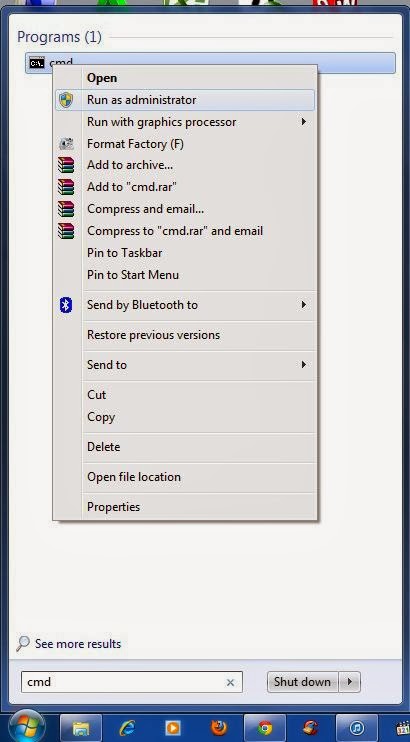
Solusinya :
Click kanan pada cmd.exe dan pilih run as administrator.

You can follow any responses to this entry through the RSS 2.0 feed.
You can leave a response, or trackback from your own site.
5,145 Responses to “Solusi HRESULT 0xc8000222 Saat Install .Net Framework 4”
Leave a Reply
You must be logged in to post a comment.


shaka says:
October 16th, 2026 at 8:28 PM
shaka
[…]very few sites that take place to be detailed beneath, from our point of view are undoubtedly properly worth checking out[…]
esports says:
October 19th, 2026 at 7:38 AM
esports
[…]very couple of websites that come about to become detailed beneath, from our point of view are undoubtedly effectively really worth checking out[…]
agents says:
October 20th, 2026 at 1:31 PM
agents
[…]very few web-sites that come about to become detailed below, from our point of view are undoubtedly well worth checking out[…]
reputation partners says:
October 25th, 2026 at 3:05 PM
reputation partners
[…]we came across a cool web page that you may possibly love. Take a search when you want[…]
best crypto casino reddit says:
October 26th, 2026 at 1:11 PM
best crypto casino reddit
[…]Here is a good Weblog You might Locate Fascinating that we Encourage You[…]