
Solusi HRESULT 0xc8000222 Saat Install .Net Framework 4
Tuesday, September 9, 2014 12:27Posted in category Komputer

Tanpa perlu basa basi. Ini dia caranya :
1. Click Start > Run.
2. Tulis cmd dan tekan Enter, kemudian Ketik net stop WuAuServ

3. Click Start > Run, tulis %windir% dan tekan Enter.
4. Cari folder SoftwareDistribution lalu rename/ganti nama menjadi SDold

5. Click Start> Run, tulis cmd dan tekan Enter. Lalu ketik net start WuAuServ
Jika tidak bisa cara diatas seperti comment dibawah ini :
System error 5.
Access denied.
Solusinya :
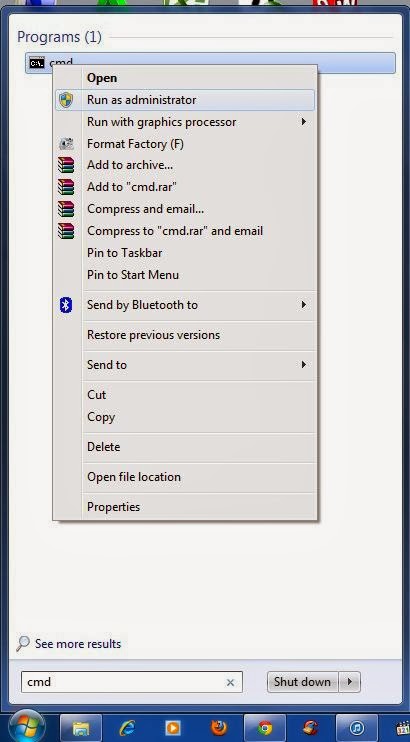
Click kanan pada cmd.exe dan pilih run as administrator.

You can follow any responses to this entry through the RSS 2.0 feed.
You can leave a response, or trackback from your own site.
5,122 Responses to “Solusi HRESULT 0xc8000222 Saat Install .Net Framework 4”
Leave a Reply
You must be logged in to post a comment.


WishHour.Com says:
May 20th, 2026 at 11:25 AM
WishHour.Com
[…]although internet sites we backlink to below are considerably not related to ours, we feel they may be truly worth a go via, so have a look[…]
sildenafil heart problems says:
May 26th, 2026 at 8:31 PM
sildenafil heart problems
sildenafil heart problems