
CorelDraw – Bezier Tool
Tuesday, September 9, 2008 3:46Posted in category Tool-Tool CorelDraw
Bezier Tool 
Tool ini dipakai untuk membuat garis len gkun g atau kurva dengan bantuan titik-titik (node) dan control point.
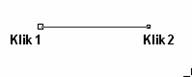
1. Klik Bezier Tool klik 1, kemudian tarik, klik 2 untuk membuat garis lurus.
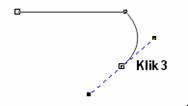
2. Klik 3 sambil melakukan drag control point kearah kiri
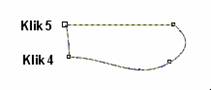
3. Klik 4 , klik 5
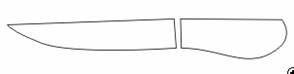
4. Lanjutkan untuk men gh asilkan obyek pisau seperti diatas.
You can follow any responses to this entry through the RSS 2.0 feed.
You can leave a response, or trackback from your own site.


meritking says:
April 24th, 2023 at 6:11 PM
CorelDraw
https://ascuoladiprevenzione.it/cosa-sono-scarpe-antinfortunistiche/
grandpashabet says:
April 27th, 2023 at 12:16 AM
CorelDraw
https://saneringstjanst.se/portfolio/exempelprojekt/
meritking says:
May 13th, 2023 at 7:31 PM
CorelDraw
https://bigsmokehair.com/shop/indian-straight-boss-price/
meritking says:
May 15th, 2023 at 10:59 PM
CorelDraw
https://www.etreorthophonisteaujourdhui.com/logiciel-orthophoniste-liberal/loi-sante-2022-quest-ce-qui-change-pour-les-kines/
madridbet says:
May 18th, 2023 at 7:53 PM
CorelDraw
https://549mtbr.com/spomenica-za-porodicu-poginulog-borca-dragana-drakulovica/
meritking says:
August 8th, 2023 at 9:11 PM
CorelDraw
https://www.reviewbymo.com/2022/10/25/รีวีวข้อดีข้อเสียของ-live-casino/
porn says:
October 31st, 2023 at 10:52 AM
CorelDraw
https://jamdigitalmu.com/tips-memilih-jam-digital-masjid/
casino porna says:
May 17th, 2024 at 1:26 AM
CorelDraw
https://www.startbassano.it/2016/03/manuel-pablo-pace/
child porn says:
April 13th, 2025 at 7:22 PM
CorelDraw
http://www.marin-med-mne.com/en/2017/10/30/marin-med-montenegro-donated-aed-budvanska-rivijera-hotel-group/
essex university library says:
August 28th, 2025 at 3:18 PM
essex university library
blog topic